Video Brief Template: How to Brief a Video Editor
 By Techspeak Team
November 14, 2026
8 min read
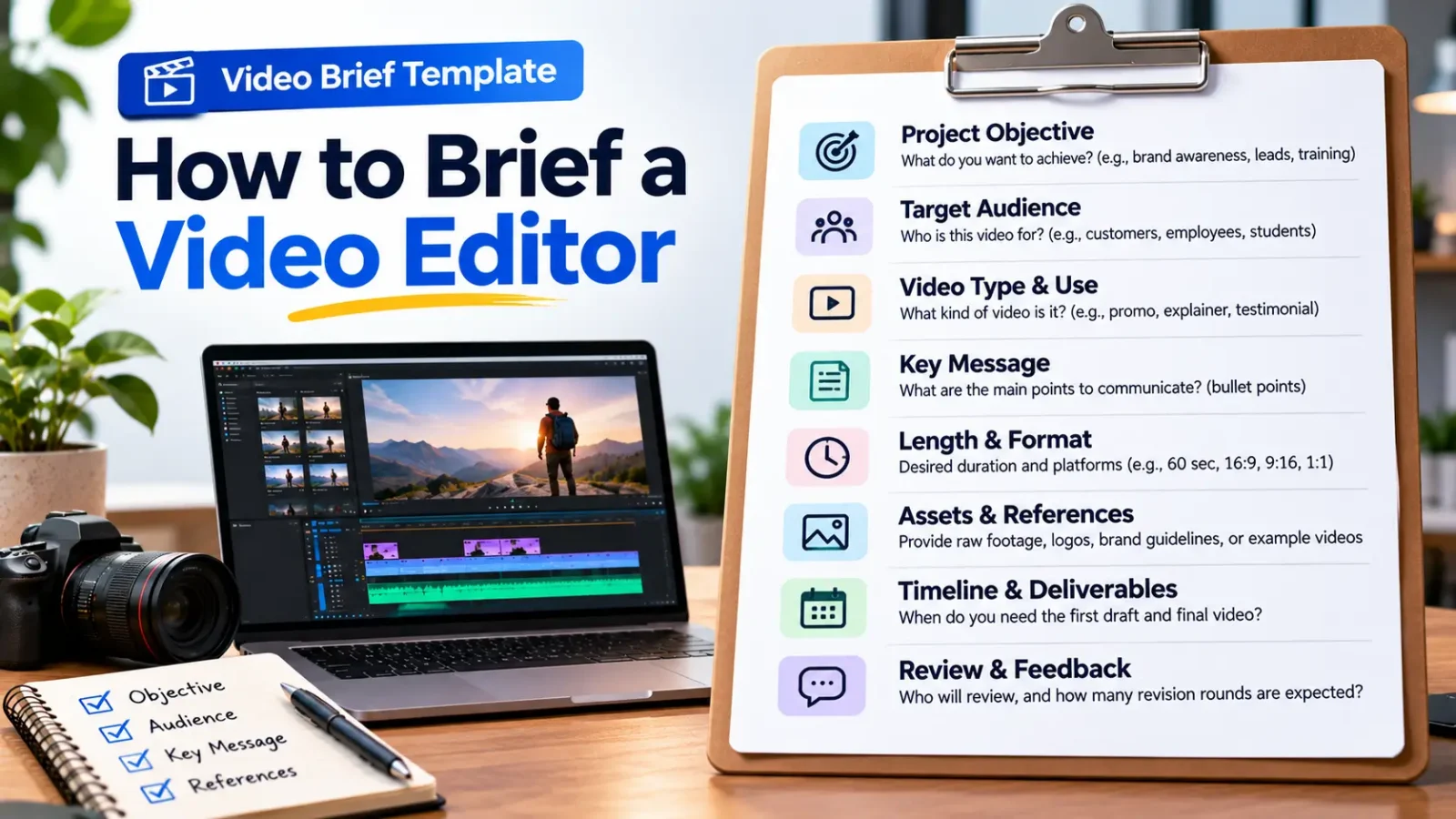
A video brief is a short document that tells your video editor or agency what the video is for, who it is for, what footage and assets you have, what formats you need, the style you want, the deadline and how feedback will work. A clear brief usually means fewer revisions, more accurate quotes and a faster start. Use the template below, or download the Word version.
Most video editing problems start before the first cut. A vague request (“make it look good, keep it short”) leads to guesses, guesses lead to revisions, and revisions cost time and money. A one-page brief fixes most of that.
This guide explains what a video brief is, what to include, how each section works, and gives you a filled-in example you can copy. There is also a downloadable Word template at the end.
What is a video brief?
A video brief is the instruction document you give to the person or team making or editing your video. You may also see it called a video creative brief, a video production brief or a video editing brief. The names overlap, but there is a useful distinction:
- A video creative or production brief covers the whole project: concept, script, shoot and edit.
- A video editing brief covers post-production only: you already have the footage and need it turned into finished videos.
The template in this guide works for both. If you are only editing existing footage, you can skip the sections on filming.
Why a video brief matters
- It reduces guesswork. The editor does not have to infer your goal, audience or style.
- It tends to cut revision rounds. Many revisions come from unstated expectations. Writing them down early helps.
- It makes quotes comparable. When every agency receives the same brief, you can compare like with like. See what affects video editing cost for the factors that change a quote.
- It speeds up the start. The editor can begin work immediately instead of sending a list of questions.
- It gives you something to check against. When reviewing the first cut, you can ask whether it meets the brief.
What to include: the 12 sections of a video brief
| # | Section | What to include | Example |
| 1 | Project overview | Project name, company, who owns the brief, date, version | “Q4 webinar highlights, Marketing team, brief owner: [name]” |
| 2 | Purpose and goal | What the video should achieve, and what viewers should do or think afterward | “Promote the on-demand webinar and drive sign-ups” |
| 3 | Audience | Who it is for, what they already know, where they will watch | “Marketing managers, familiar with our product, watching on LinkedIn” |
| 4 | Key message and call to action | One-sentence message, up to three supporting points, the next step for viewers | “Message: simple reporting saves time. CTA: register for the on-demand session” |
| 5 | Source footage and assets | Type of footage, total length, where files are stored, audio quality, script or transcript, brand assets | “60-minute webinar recording, clean audio, transcript attached, logo and fonts in shared folder” |
| 6 | Deliverables | Number of videos, length of each, aspect ratios, platforms, captions, file formats | “6 clips, 30–60 seconds each, vertical, captions included” |
| 7 | Style and tone | Tone, pacing, reference videos and what you like about them, music, graphics | “Professional but friendly, quick pacing, references attached” |
| 8 | Brand guidelines | Colors, fonts, logo use, intro and outro, naming and spelling rules | “Brand guide linked, end card required” |
| 9 | Must-haves and must-avoids | What has to appear, what must not, any sensitive or legal content | “Must show product name in every clip. Avoid showing customer names” |
| 10 | Timeline | First draft date, review window, final delivery, hard deadlines | “First draft in 5 working days, final before the launch” |
| 11 | Review and approval | Who gives feedback, who approves, how feedback is shared, revision rounds, what counts as a new request | “One consolidated feedback document, 2 rounds, final approval by [name]” |
| 12 | Budget and usage rights | Budget range or pricing approach, where and how long the video will be used, music and stock licensing, who owns the files | “Per-video pricing, used on social and website for one year, project files delivered” |
Filled-in example: webinar highlights
This is an illustrative example for a made-up company, to show what a completed brief looks like.
| Section | Example answer |
| Project | Webinar highlights: “Simplifying Monthly Reporting”. Owner: marketing manager. |
| Goal | Drive registrations for the on-demand version of the webinar. |
| Audience | Marketing and operations managers at small and mid-sized companies, already familiar with our product. |
| Message and CTA | Message: reporting does not have to take a full day. CTA: watch the full webinar on demand. |
| Source material | One 60-minute recording, clean audio, transcript attached, slides as PDF, logo and fonts in the shared folder. |
| Deliverables | Six clips of 30–60 seconds, vertical and square versions, captions on screen, MP4 files. |
| Style | Professional but friendly, quick pacing, strong opening line in each clip. Two reference videos attached. |
| Brand | Colors and fonts from the brand guide, end card with webinar link. |
| Must / avoid | Include product name in each clip. Avoid showing attendee names or chat messages. |
| Timeline | Selects within 3 working days, first drafts within 7, final delivery before the campaign start date. |
| Review | One person collects feedback. Two revision rounds included. Final approval by the marketing manager. |
| Budget and rights | Per-clip pricing preferred. Used on social channels and website for one year. Project files to be delivered. |
How to write a good brief: practical tips
- Be specific. “A 45-second vertical clip with captions” is better than “a short video”.
- Attach references. Two or three videos you like, with a line on what you like about each, communicate style better than adjectives.
- Say what you do not want. Examples of styles or elements to avoid prevent wasted rounds.
- Name one decision-maker. Conflicting feedback from several people is a common cause of delays. Ask one person to collect and consolidate feedback.
- State what success looks like. Even a simple goal helps the editor make choices.
- Share files and links early, and test the links before sending.
- Flag sensitive material. Mention anything legal, confidential or reputation-related up front.
- Keep it to one or two pages. A brief is a working document, not a report.
Common video brief mistakes
- Missing the goal. Without a purpose, every edit is a guess.
- Describing the style only in adjectives. “Modern” and “clean” mean different things to different people.
- Leaving out the deliverables. Formats, lengths and platforms change the whole edit.
- No review process. Unclear feedback rounds lead to endless revisions.
- Late changes to scope. Adding formats or versions after work starts affects timeline and cost.
- Poor source files. Disorganized or missing assets slow everything down.
Download the video brief template
The Word template follows the 12 sections above, with prompts in each field and a short checklist to run before you send it. Fill it in and send it to any editor or agency, including us.
Rather not write it alone? If you have footage and are not sure what to put in the brief, book a 30-minute strategy call and we will help you work out what you need. TechSpeak’s video production services cover production and editing.
How a good brief fits into your video process
A brief is the first step in a larger process. If you want to understand what happens after you send it, read How Professional Video Editing Helps Businesses Get More From Their Content. If you are planning clips from one recording, see How to Turn One Long Video Into 10+ Short Videos. When you are comparing providers, send each one the same brief and use our guide to choosing a video editing agency. For corporate projects, see what to expect from corporate video editing
Frequently asked questions
What is a video brief? A video brief is a short document that explains the purpose, audience, source material, formats, style, timeline and review process for a video project, so the editor or agency can work from clear instructions.
What is the difference between a video creative brief and a video editing brief? A creative or production brief covers the whole project from concept to final edit. An editing brief covers post-production only, for when you already have footage. The same template works for both.
What should a video brief include? The purpose, audience, key message, source footage and assets, deliverables, style references, brand guidelines, must-haves and must-avoids, timeline, review process and budget or usage rights.
How long should a video brief be? Usually one to two pages. It should be detailed enough to avoid guesswork and short enough that people actually read it.
Can I use this template for filmed video, not just editing? Yes. Fill in the sections that apply. For a shoot, add details such as locations, talent, script and equipment in the “anything else” area.
Who should write the video brief? The person who owns the video’s goal, usually someone in marketing or the business owner. Agencies can help you complete it, but the goal and audience need to come from you.
Do I need a brief for a small edit? A very small, informal edit may only need a few lines. For anything public-facing or any job with several formats or reviewers, a brief saves time.
Ready to brief your editor?
Download the template, fill it in and send it. If you want help turning your footage into finished videos, book a 30-minute strategy call with TechSpeak or contact us to discuss your video requirements.

Techspeak Team
Part of the Techspeak team, writing about SEO, GEO, local search and growth.